



How to change home screen icon size
UPDATE: 2025.03.28
+HOME is a customizable Android theme app that allows you to personalize your smartphone.
For those who find the home screen icons too small and hard to see! This article introduces how to change the size of home screen icons.
How to open Theme DIY
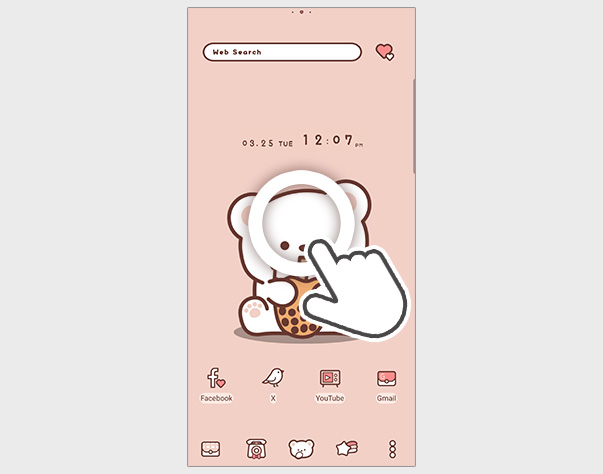
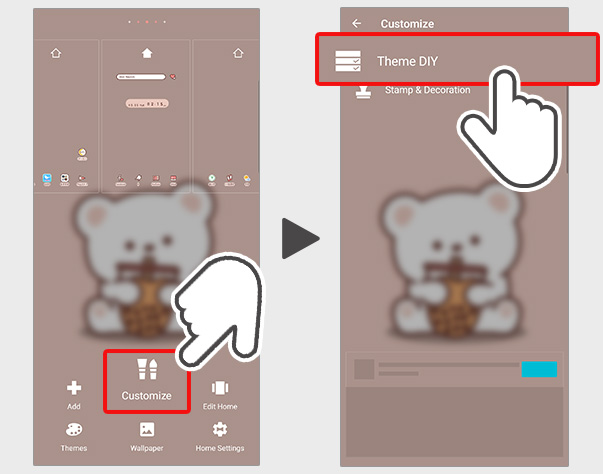
1. Long press on the home screen and select Customize
2. Select Theme DIY
How to change the home screen icon size
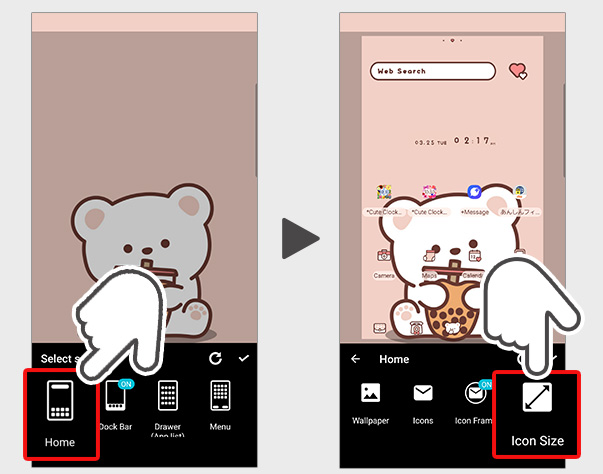
1. Select Home
2. Select Icon Size
3. You can change the icon size using the slide bar.
100% is the default size; sliding to the right increases the size, while sliding to the left decreases it.
4. After completing the size settings, select the check button.
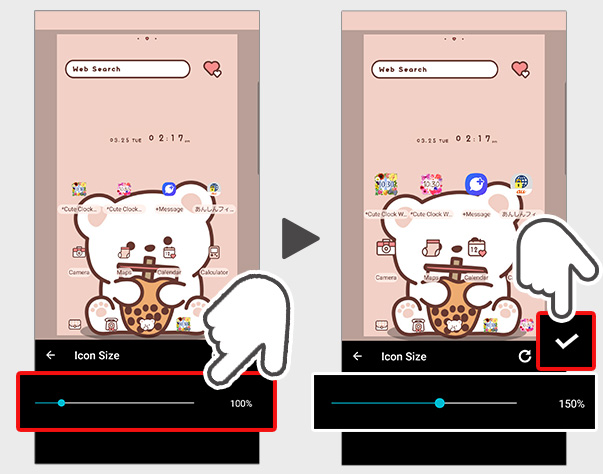
5. The home screen icons will now be displayed in a larger size.
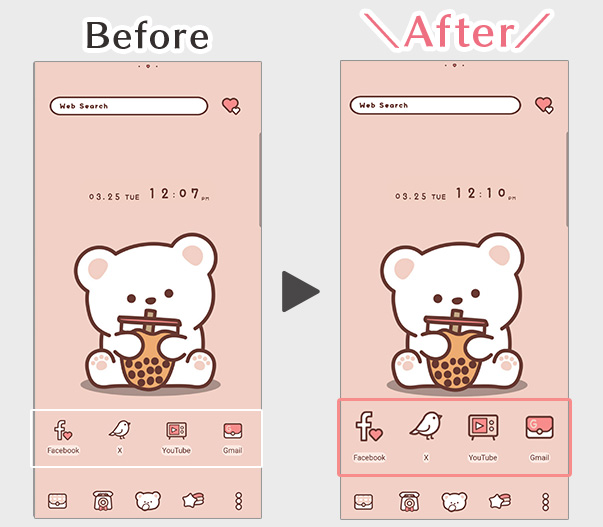
Introducing the themes I used for customization♪
Bubble Tea Bear


An adorable theme of a polar bear and his bubble tea.

List of How to Use +HOME
-
About the Home Screen
-
Let's Change the Theme
-
How to Use the Drawer (App List)
-
Mastering the Home Screen
-
About the Iconpacks
-
How to Change Home Screen Icons Individually
-
How to Change Home Screen Icons All at Once
-
How to Change Home Screen Icons with Your Favorite Images
-
How to change home screen icon size
+HOME Special Features List.
-
🌼 Floral Print Special Feature 🌼
Get your hands on a stylish floral dress-up theme now! Adorn your home screen with delicate flower motifs for a gorgeous and sophisticated look🌼
-
🦾 Motifs of Motivation Switch🔥 Special Feature 🔥.
Motivation is stimulated! Enjoy the flame and switch button themed smartphone kisekae feature 🔥
-
🧉 Cold Drink Theme Special 🧉
Decorate your phone with summer drink motifs! Check out the Kisekae feature packed with soda, lemonade, and other charms 🧃
-
✨️ Sparkling Illumination Theme ✨️
Capture the breathtaking night sky lights on your phone! Enjoy a magical nighttime atmosphere effortlessly with beautiful illumination themes 💖
-
💞 Simple Heart Theme Special Feature 💞
Simple hearts to brighten up your smartphone! Get your hands on an adorable and sophisticated screen with this custom theme 💞
-
🕯️ Healing Candle Theme Special Feature 🕯️
A soothing flame illuminates your smartphone! Enjoy a warm and fantastical candle night with this candle-themed customization✨️
-
🍩 Delicious-Looking Donut Theme Special 😋
Add some sweet magic to your smartphone screen! Get in the mood with a donut and sweets theme 🍩😋
-
🗻 New Year's Fortune-Boosting Theme 2026 🗻
Bring good fortune to your phone in 2026! Dramatically boost your New Year's luck with our lucky motif theme! 🔝😆
-
💖 Overflowing Love Theme Special 💖
Be captivated by love's brilliance! Dramatically transform your phone into the world's most passionate and adorable space with this heart-themed customization💖
-
🎄 Christmas Tree Theme 2025 Special Feature 🎄
Get into the Christmas spirit! Brighten up your screen with a festive tree theme for your smartphone 🎄
-
🍫 CHOCOLATE Special 🍫
Special feature on smartphone dress-up to enhance the CHOCOLATE's Day mood! Express your feelings with sweet chocolate-themed design items!
-
️⛄️ Cute Snowman Theme Special️ ⛄️
Winter idols gather on your smartphone! Get a heartwarming screen decorated with adorable snowmen in a snowman dress-up theme️⛄️
-
🍎 Lucky Charm Theme Special 🍀
Transform your screen into a positive space using cute avocado and lucky charm charm wallpapers🥑
-
🍒 Cute cherry sky special 🍒
Decorate your phone with the charm of cherries! Offers Kisekae themes with adorable wallpapers!
-
🍁 Autumn Foliage Theme Special 2025 🍁
Enjoy autumn foliage on your smartphone! Dress up your device with themes featuring breathtaking views dyed red, yellow, and every shade in between—all yours to savor! 🍁
-
🤍 Clean white color feature 🤍
Pure white brilliance! White roses, clouds, and simple designs shine through in a variety of stylish and easy themes 🤍
-
🌙 A crescent moon theme feature that invites you to a dreamy night. 🌙
🌙We have collected themes with fantastic and romantic designs that combine the crescent moon, which signals the beginning of the night, with twinkling stars.
-
💎 Special Birthstones from July to December 💎
The theme of the birthstones from July to December is the theme of Kisekae! Which gemstone will color your birth month? 💎✨
-
🎐 Special Feature on Summer in Japan 🎐
Sparkling fireworks and cool waters! Enjoy the Japanese summer theme on your smartphone and immerse yourself in the Japanese spirit.